Since the day <canvas> shipped, putting text in it has meant giving the text up. You draw glyphs with fillText, and from then on they are pixels. Nobody can select them, search them, tab to a link in them, or hear them read aloud. Every WebGL site with real copy either rebuilds a fake DOM on top or accepts the loss.
QUARTO is a page where that trade is off. It is an essay about how a printed booklet is made, set on a single sheet of paper that folds twice into eight pages while you scroll. The sheet is a mesh on the GPU. The ink is the article’s own paragraphs, and you can drag across them with the mouse. Two of the eight pages are printed upside down, because that is how a real press sheet looks before folding, and you can select those too.
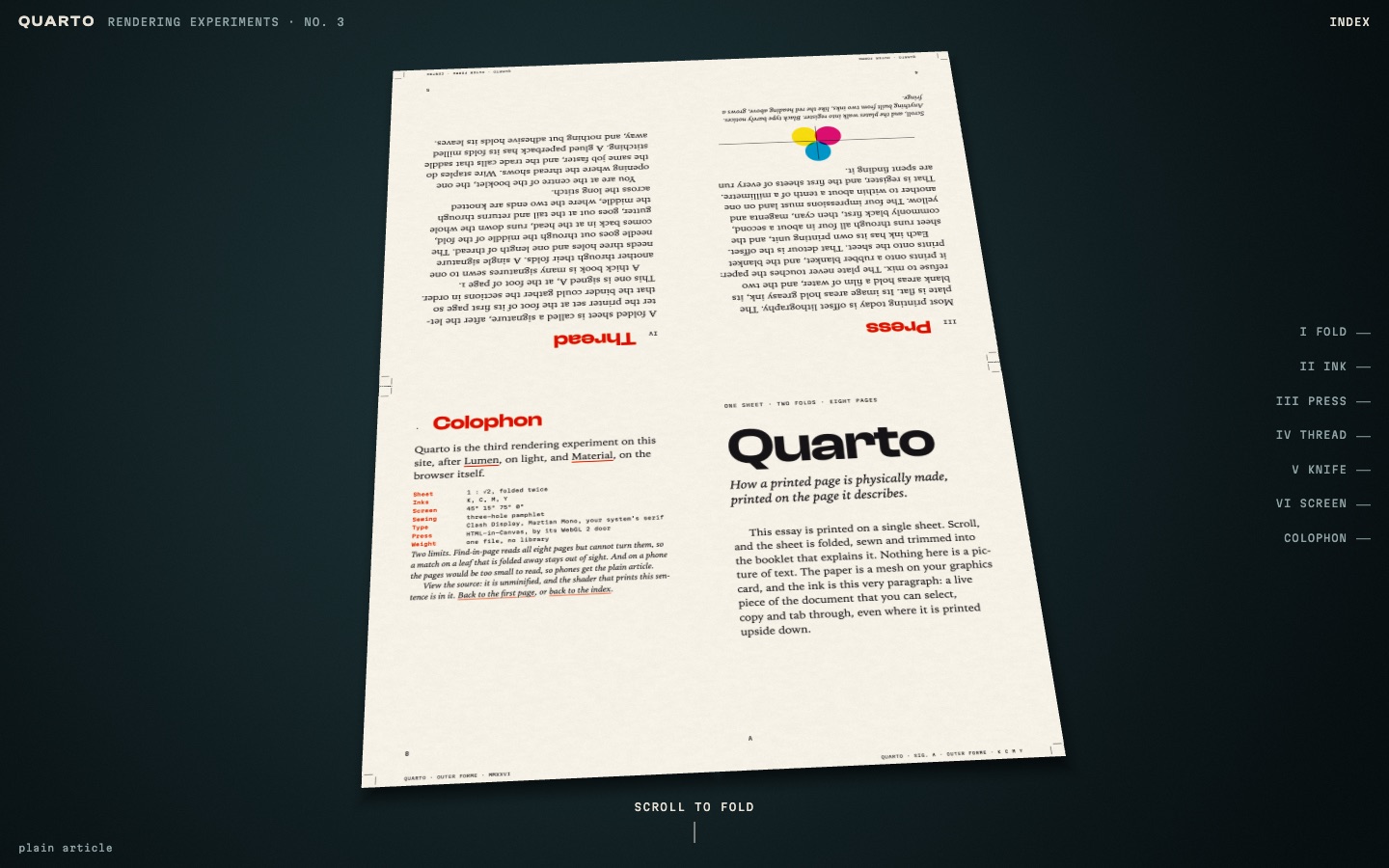
That picture is a screenshot, for once. Inside a frame as narrow as this column the page falls back to its plain article, and the live sheet only exists in Chrome and Edge. More on both below.
What changed in October
The API is called HTML-in-Canvas. It spent most of 2026 in an origin trial and shipped in Chrome 157 at the end of October. When I wrote LUMEN in July, a page needed an origin trial token to use it.
The idea fits in one sentence: children of a canvas are laid out by the browser as usual, but they only appear where you draw them. You mark the canvas, mark the children, and wait for an event.
<canvas content="drawable">
  <section drawable>…a page of the essay…</section>
</canvas>
The browser fires paint on the canvas whenever one of those children would look different. A font arrived, a link got focus, someone selected a word. The event lists which elements changed, and you upload only those. In WebGL 2 the upload is one call:
function onPaint(ev) {
  const list = needAll ? pages : ev.changedElements || pages;
  for (const el of list) upload(el);
}

// inside upload(el)
gl.pixelStorei(gl.UNPACK_PREMULTIPLY_ALPHA_WEBGL, true);
gl.texElementSubImage2D(gl.TEXTURE_2D, 0, 0, 0, el, {
  width: L.texW,
  height: L.texH,
});
From there each page of the essay is a texture, and a texture can go anywhere. Mine go on four rigid panels, front and back, which is a sheet of paper folded in half twice.
The call that keeps it a document
Drawing the DOM into a texture is only half of the API, and on its own it would be a screenshot. The other half runs in the opposite direction. On every frame, QUARTO tells the browser where each page ended up on screen:
canvas.updateElementGeometry(pages[i], {
  canvasTransform: new DOMMatrix(m),
});
m is the full matrix for that page, perspective included. With it the browser can hit-test a click, place a caret, extend a selection and draw a focus ring, all on a page that is tilted, mid-fold, or upside down. I pass nothing else. There is no invisible overlay of positioned spans and no second copy of the text.
Two things here rest on observation and not on documentation. Hit-testing holds under a perspective matrix, not only for flat placement. And texElementSubImage2D honours the premultiply flag. I could not find either spelled out, so both are behaviours I checked in Chrome and then relied on.
What the paper demonstrates
The rule for this series is that the graphics have to demonstrate the subject. Here the subject is print, so each chapter does to the article what a printer does to a sheet.
Fold comes first. Which page goes where on a press sheet is called imposition, and printers look it up in a table. The page does not have the table. It folds the mesh, sorts the four panels front to back, and reads the page numbers off the result:
const folded = panels.map(p => panelMatrix(p, Math.PI, Math.PI, 0));
const order = panels
  .map((_, i) => i)
  .sort((i, j) => folded[j][14] - folded[i][14]);
Pages 1, 4, 5 and 8 land on one side and 2, 3, 6 and 7 on the other, with 4 and 5 head down. That is the standard quarto layout, and it appears nowhere in the source as a list.
Ink separates the DOM pixels into cyan, magenta, yellow and black in the fragment shader and prints them back subtractively on procedural paper. A loupe shows the halftone dots at the classic screen angles, 15, 75, 0 and 45 degrees. Solid black type skips the screen, as it does on a real press. Press lays the four plates down out of register and walks them into place. Thread sews a three-hole pamphlet stitch into the centre fold. Knife trims to the crop marks and cuts the slug line away.
Three things that bit me
The names moved. Examples from the trial put layoutsubtree on the canvas. That attribute became content="drawable" in Chrome 155, and the WebGPU method was renamed in the same release. One of Chrome’s own posts says the trial runs through version 160, but it predates the launch. If you start from a tutorial, check its date against the explainer.
One element gets one matrix. The leaves bend while they turn: each panel is tessellated and rolled into an arc in the vertex shader, with arc length preserved so the paper does not stretch. A curved page cannot be described by a single matrix, so during a turn I pin the page’s four corners to the curled panel with a homography, and hit-testing is approximate. The curvature follows sin² of the panel’s progress and is exactly zero at every stop. At rest the sheet is flat and the matrix is exact again. I would not ship the curl without that guarantee.
Find-in-page reads all eight pages but cannot turn them. Chrome finds a word on a folded-away leaf and has no way to show it, because there is no event for the active match. hidden="until-found" would give me one, but it also stops the page from painting into its texture. The colophon admits the limit.
Who gets what
Chrome and Edge from 157 get the sheet. Firefox and Safari have no implementation, so they get the essay as a plain, typeset article, complete. Phones get the plain article as well. Below a page width of 410 CSS pixels the type on the sheet would be too small to read, and soft small text is worse than no effect.
The promotion to the live mode is provisional. If no paint event arrives within a second and a half, or the GL context is lost, the script moves the article back into the normal flow. Rendering is on demand: when the sheet is at rest, the page draws nothing.
That is a narrow audience for the main idea. I kept it because the fallback is the content itself, and nothing in the essay depends on seeing the paper. A reader in Firefox misses the demonstration and still gets every paragraph.
The page is one file, 3,089 lines and 113 KB, with no library. It uses the WebGL 2 entry point of the API; there is a WebGPU one that I have not tried. Open QUARTO in Chrome and, on the opening sheet, double-click a word on page 4. It is one of the two printed upside down.