Part 2 of 5 in GitHub without the website: rebuilding just enough of GitHub to see where Git stops and the product begins.
The first misleading thing about git push is the verb.
“Push” sounds like uploading your project to a server. That is close enough for daily work, but it hides the part that explains most Git errors.
The important part is not the upload. The important part is the negotiation.
Git does not think in project folders. Git thinks in objects and references.
When you push, Git sends the objects the remote is missing, then asks the remote to move a ref. Usually that ref is a branch name like main.
That is the whole operation in one sentence. It is also why Git can be both elegant and incredibly rude.
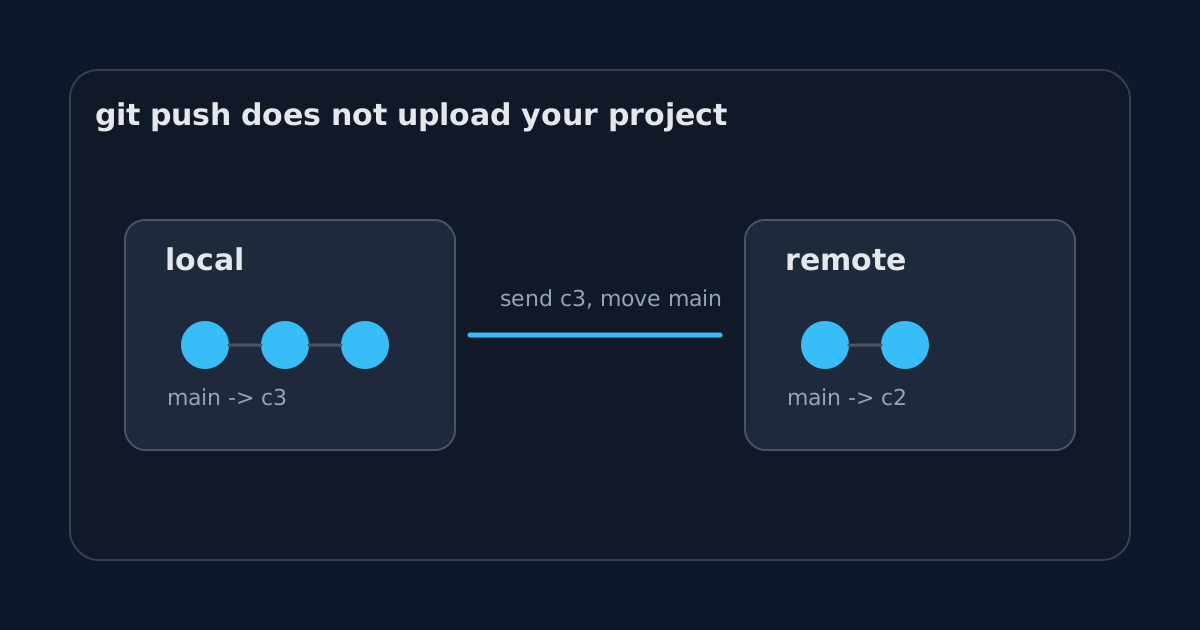
The files are not the unit
Imagine a tiny repository with one file:
printf "hello\n" > README.md
git add README.md
git commit -m "Initial commit"
Git does not store “the project” as a zip file. It stores content-addressed objects.
A simplified version looks like this:
commit c1
  tree t1
    README.md -> blob b1
The blob contains the file content. The tree says which filenames point to which blobs. The commit points to a tree and records metadata: author, message, parent commits.
Change the file and commit again:
printf "hello again\n" > README.md
git add README.md
git commit -m "Update readme"
Now the second commit points to a new tree and has the first commit as its parent.
commit c2
  parent c1
  tree t2
    README.md -> blob b2
This is the part worth keeping in your head: a branch is not a folder. A branch is a name pointing at a commit.
main might point at c2.
main -> c2The commit points backward through history. The branch name points at the tip.
The remote also has refs
Our tiny GitHub from the previous article is just a bare repository on a server.
It also has objects. It also has refs.
Before your push, the remote might only know about c1:
remote main -> c1Your laptop knows about c2:
local main -> c2When you run:
git push origin mainGit figures out that the remote is missing c2 and any objects needed by c2. Then it sends those objects. Then it asks the remote to update its main ref from c1 to c2.
If c2 descends from c1, the remote can move the pointer forward safely.
That is a fast-forward push.
before: main -> c1
after:  main -> c2
No drama. No conflict. The remote moves the label.
Why pushes get rejected
Now imagine someone else pushed first.
Your laptop thinks the world looks like this:
c1 -> c2
main -> c2
The remote has moved on:
c1 -> c3
main -> c3
Your c2 and their c3 are siblings. Neither contains the other.
If the remote accepted your push and moved main from c3 to c2, commit c3 would disappear from the branch history. It would still exist as an object for a while, but the branch would no longer point to it.
So Git says no.
! [rejected] main -> main (fetch first)That message is annoying because it shows up when you just wanted to go home. But it is doing the right thing.
The server is saying: “I cannot move this branch pointer to your commit without losing the commit I already have. Fetch first, reconcile history, then ask again.”
That is much clearer than “GitHub rejected my code.”
GitHub is not judging your code here. The ref update is not safe.
Force push is a pointer rewrite
git push --force sounds violent because it is.
It tells the remote to move the branch ref even if the move is not a fast-forward.
git push --force origin mainThat does not delete every old object immediately. Git is more boring than that. But it does change what the branch name means.
Before:
main -> c3After:
main -> c2Anyone who pulled c3 now has a history that disagrees with the server. Anyone who based work on c3 has a mess to untangle.
This is why force pushing to a shared branch feels dangerous. It is not because GitHub has a moral opinion about --force. It is because a branch is a shared pointer, and you just moved it somewhere unexpected.
--force-with-lease is a better habit because it adds one important check: “only force push if the remote is still where I think it is.”
git push --force-with-lease origin mainThat small lease protects you from overwriting someone else’s new work by accident.
GitHub’s UI is mostly explaining refs
A surprising amount of GitHub’s interface is just a friendly wrapper around this model.
The branch selector shows refs.
The commit page shows objects.
The compare view shows two commit tips and the diff between their reachable trees.
The “This branch is X commits ahead” message is graph math.
The merge button tries to create a new commit or fast-forward a ref, depending on the merge method.
The scary red warning on a protected branch is policy around a ref update.
Once you see branches as movable names, the UI becomes less mysterious.
The tiny remote can already say no
Our SSH bare repo has no web UI, but it already has the core mechanics.
If two people push incompatible updates to the same branch, the second push is rejected. If someone force pushes, the branch pointer moves. If someone creates a new branch, the server stores another ref.
You can inspect the bare repo directly:
ssh git@example.com
cd /srv/git/demo.git
git show-ref
You might see:
f3a1... refs/heads/main
9b27... refs/heads/feature/readme
That is the remote’s view of the world.
Not files. Not folders. Refs pointing at commits.
The part GitHub adds next
So far, the remote is mostly passive. It receives objects, checks whether the ref update is safe, and stores the result.
But a remote can do more than accept storage operations.
It can run code before accepting a push. It can reject direct pushes to main. It can require commit messages to match a pattern. It can block large files. It can trigger CI.
The moment the server gets to make policy decisions, the tiny GitHub stops being a passive remote and starts to look like a platform.
Previous: GitHub is just a remote until it isn’t
Next: The server gets a vote